.png)
Campaign Settings - Platform Tour
The Campaign Settings page is where you configure and manage all aspects of a lead campaign in Lead Prosper. This includes setting up Suppliers and Buyers, defining campaign fields and computed fields, configuring lead routing logic, enabling validations, managing duplicate checks, and controlling distribution settings.
Because campaigns are the core of how leads are received, processed, and sold, this page serves as the central control panel for your lead distribution workflow.
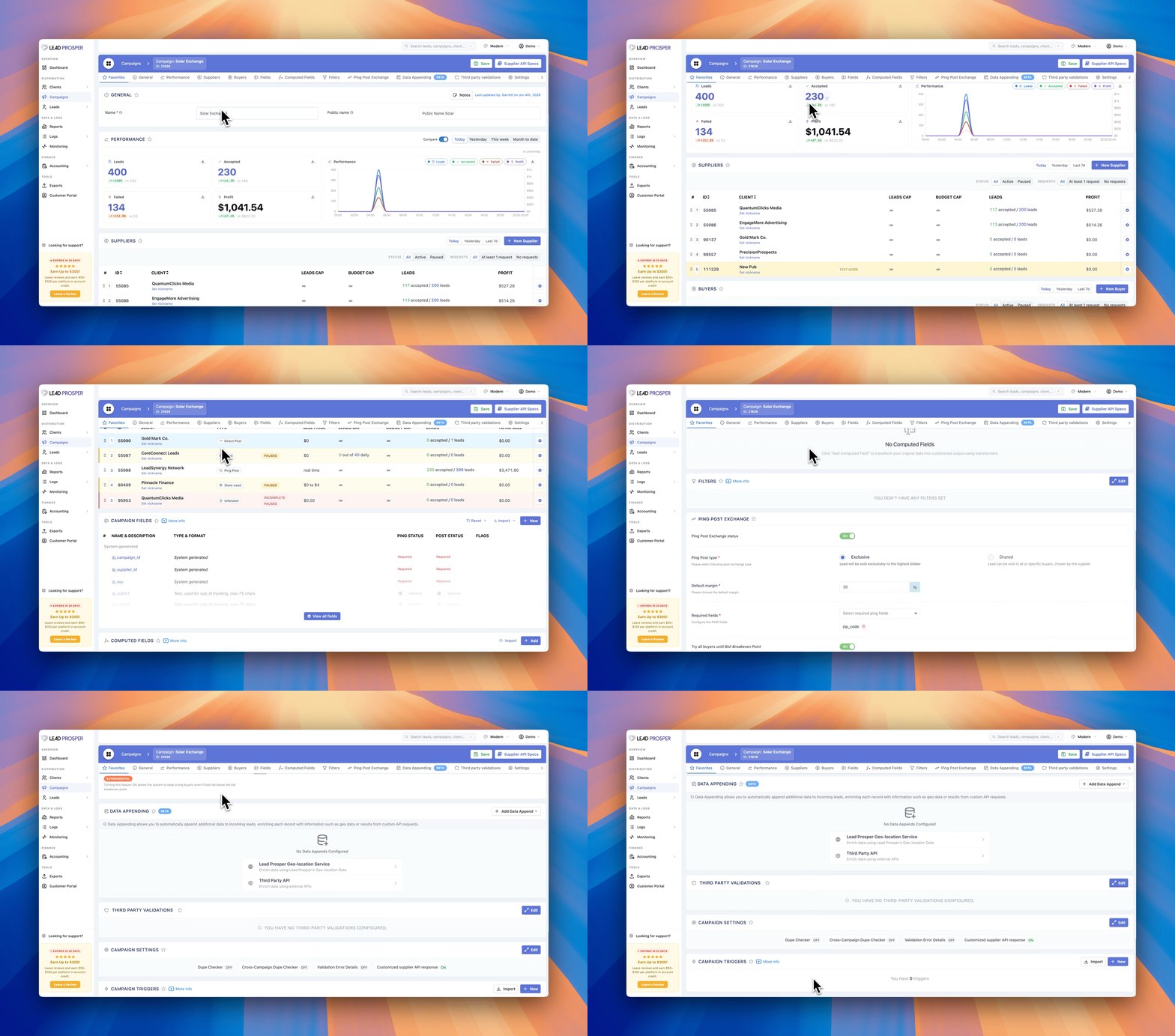
On the Campaign Settings page, you can:
- Add and manage Suppliers sending leads into the campaign
- Configure Buyers who will receive or purchase leads
- Create and manage Campaign Fields and Computed Fields
- Control lead distribution logic and campaign routing
- Configure Ping Post Exchange settings
- Set up Data Appending to enrich your leads.
- Apply filters at the global, supplier, or buyer level
- Set up duplicate checking rules
- Enable third-party validations and compliance integrations
- Configure Supplier API responses
- Create Campaign Triggers for postbacks, routing, and automations
Some key features of Campaigns include:
Suppliers and Buyers
Suppliers represent the sources sending leads into your campaign, while Buyers represent the endpoints receiving or purchasing those leads. From this page you can add, edit, pause, resume, and manage caps or budgets for both Suppliers and Buyers.
Campaign & Computed Fields
Campaign Fields define how lead data is collected and stored, including validation formats such as email, phone, numeric values, and more. Computed Fields allow you to dynamically transform or combine incoming lead data so it can be formatted exactly how each buyer requires.
Ping Post Exchange
If enabled, the campaign can operate as a Ping Post Exchange, allowing buyers to first bid on leads through a PING request before receiving the full lead through a POST request. Settings here control bidding logic, margins, required fields, and distribution behavior.
Data Appending
Data Appending allows you to automatically append additional data to incoming leads, enriching each record with information such as geo data or results from custom API requests. Choose from Lead Prosper's integrated Geo-Location Service, or use a custom API request to enirch your leads.
Filters and Routing Logic
Filters control how leads are routed through the campaign. You can create filters based on campaign field values, suppliers, date/time rules, or API validation responses. Filters can be applied globally, or specifically to suppliers or buyers.
Campaign Settings & Validations
Additional campaign settings allow you to configure duplicate checking, enable third-party validation services, and customize the Supplier API response. These settings help ensure data quality, compliance, and proper routing behavior.
Campaign Triggers
Campaign Triggers allow you to automate actions after a lead has processed. For example, you can send postbacks to tracking platforms, route unsold leads to another campaign, store lead data in external systems, or trigger additional workflows.
The Campaign Settings page is where the core logic of your lead distribution system is defined. It is commonly used when creating new campaigns, adjusting routing logic, configuring suppliers and buyers, enabling compliance checks, or optimizing how leads are sold. Because nearly every operational component of a campaign is controlled here, this page provides the flexibility needed to design and manage complex lead distribution workflows.