.png)
Buyer Groups in Lead Prosper: Setup, Distribution Logic, and Use Cases
Buyer Groups is a distribution type that lets you organize your buyers into ordered tiers (groups), each with its own distribution strategy. Leads flow through groups sequentially - you control whether the flow stops after a group sells or continues to the next group.
This gives you fine-grained control over how leads are distributed. Use Buyer Groups when you need more control than a single distribution type can provide:
- Multi-tier buyer strategies - organize buyers into priority tiers (e.g., premium first, fallback second). Try selling exclusively to premium buyers first, and only fall back to shared buyers if they all reject.
- Streamline real-time and DQ campaign configuration - consolidate complex buyer setups into a single, organized campaign instead of managing multiple campaigns or workarounds.
- Mix exclusive and shared selling - sell exclusively to one group, then shared to another, all within the same campaign. Combine different distribution strategies (e.g., Waterfall in one tier, Send to All in another).
Note: Buyer Groups are only available for Direct Post campaigns. They are not available for Ping/Post Exchange campaigns.
Setting Up Buyer Groups
1. Enable Buyer Groups
On the campaign edit page, change the Distribution type dropdown to Buyer groups. A Total buyers limit field will appear — this caps the maximum number of buyers that can accept a single lead across all groups.

2. Create Groups
In the Buyers section, click New Group.
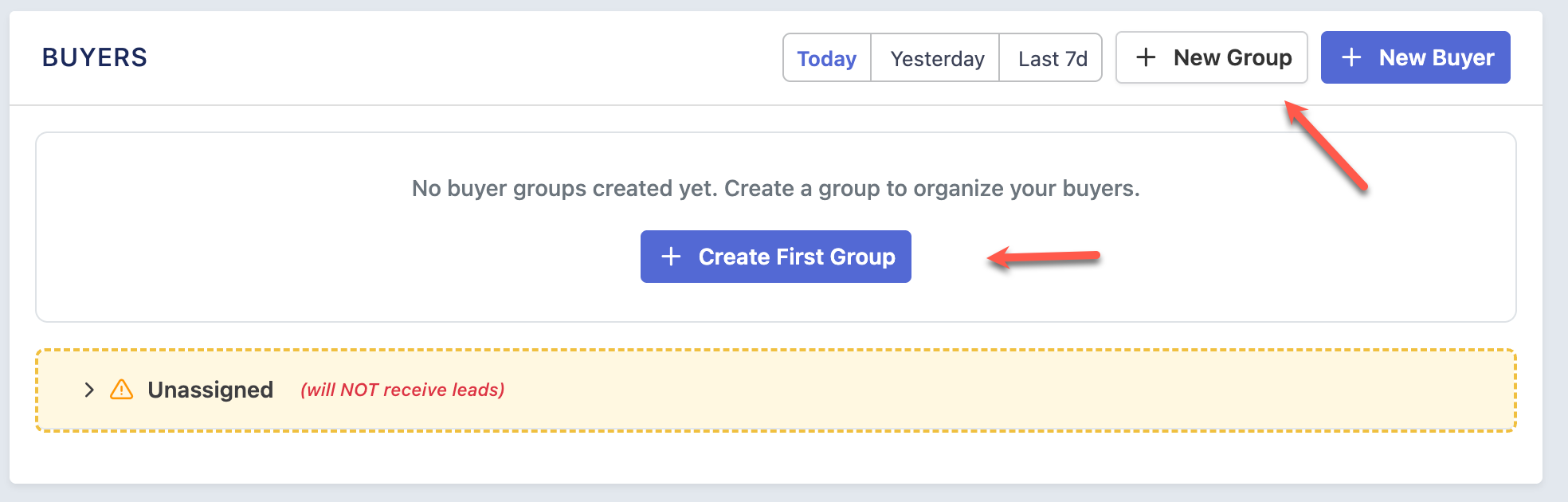
Each group has:
- Name — A label for the group (e.g., "Tier 1", "Premium Buyers", "Shared Fallback").
- Position — Groups are processed top to bottom. Drag groups to reorder them.
- Distribution Type — How buyers within this group are selected (see below).
- Limit — (Send to All / Round Robin only) How many buyers within this group can accept the lead. Set to 0 for no limit.
- If sold — What happens after this group successfully sells the lead (see below).
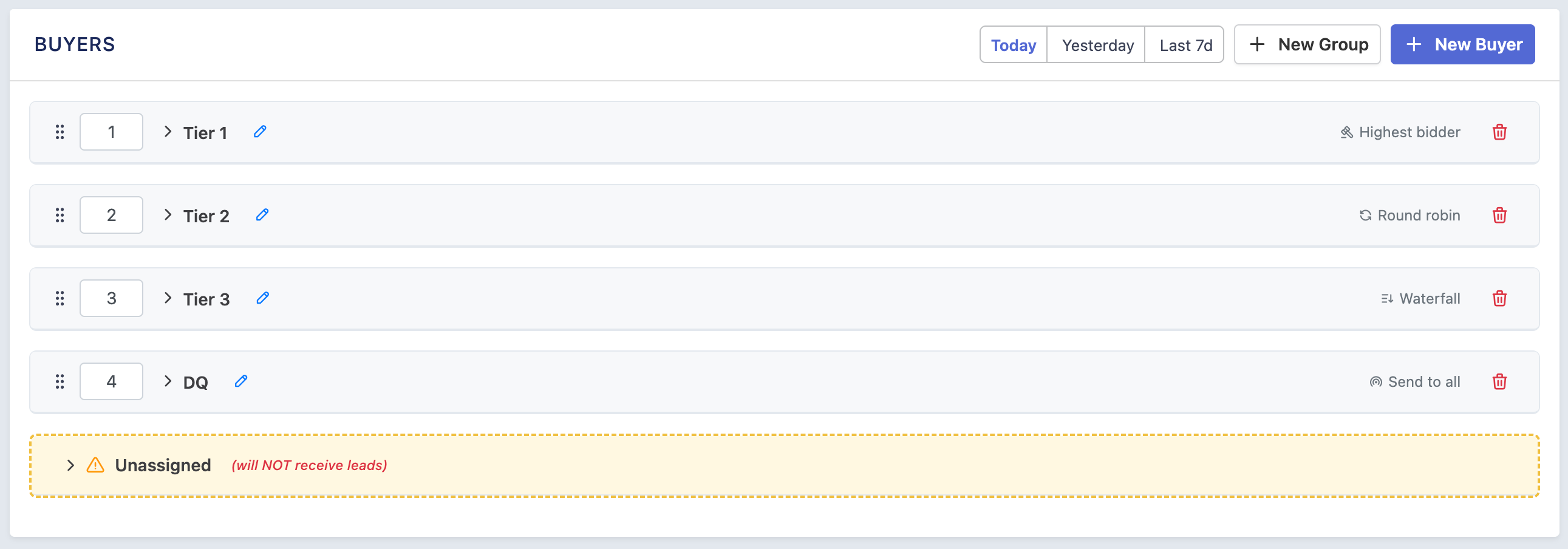
3. Assign Buyers
Drag buyers from the Unassigned section into a group, or use the group badge dropdown on each buyer row to move them between groups.
Unassigned buyers will not receive leads.
Distribution Types (Per Group)
Each group has its own distribution type that controls how buyers within that group are processed:
| Type | Behavior | Limit field |
|---|---|---|
| Waterfall | Tries buyers one at a time, in order. Stops at the first acceptance. | Not shown (always 1) |
| Highest Bidder | Sends to all buyers simultaneously, accepts only the highest bid. | Not shown (always 1) |
| Round Robin | Rotates through buyers across leads. Sends to N buyers per lead. | Required (min 1) |
| Send to All | Sends to all (or up to N) buyers simultaneously. | Optional (0 = all) |
Key Settings
Total Buyers Limit (Campaign Level)
Found next to the Distribution type dropdown. This is the maximum number of buyers that can accept a single lead across all groups combined.
- If a group has "If sold: Try next group", sales accumulate toward this total.
- Once the total is reached, no further groups are processed.
If Sold (Per Group)
Controls what happens after a group successfully sells the lead (at least one buyer accepts):
| Setting | Behavior |
|---|---|
| Stop (default) | The flow stops immediately. No further groups are tried. Use this for exclusive tiers. |
| Try next group | The flow continues to the next group. Sales accumulate toward the Total buyers limit. Use this when you want to sell across multiple groups. |
When a group fails (all buyers reject or are skipped), the flow always continues to the next group regardless of this setting.
How the Flow Works (Summary)
- Groups are processed top to bottom (by position).
- For each group, the system filters eligible buyers assigned to that group and runs the group's distribution strategy.
- After a group runs:
- If the group sold (1+ buyers accepted):
- "If sold: Stop" — the entire flow stops. No more groups.
- "If sold: Try next group" — sales are added to the running total, and the next group runs.
- If the group failed (0 buyers accepted) — the flow always continues to the next group.
- If the group sold (1+ buyers accepted):
- The flow also stops if the Total buyers limit is reached, regardless of the "If sold" setting.
- Buyers in the Unassigned section are skipped entirely and will not receive leads.
Common Use Cases
Use Case 1: Exclusive Tiers with Shared Fallback
Goal: Try to sell the lead exclusively (to 1 buyer) through premium tiers. If all reject, sell to up to 5 shared buyers.
| Group | Distribution | Limit | If sold | Buyers |
|---|---|---|---|---|
| Tier 1 | Highest Bidder | — | Stop | Premium buyers |
| Tier 2 | Waterfall | — | Stop | Mid-tier buyers |
| Tier 3 | Send to All | 5 | Stop | Shared/fallback buyers |
Total buyers limit: 5
How it works:
- Tier 1 runs Highest Bidder. If a buyer accepts, the flow stops — 1 exclusive sale.
- If Tier 1 fails, Tier 2 tries buyers one by one (Waterfall). If one accepts, the flow stops — 1 exclusive sale.
- If both fail, Tier 3 sends to all buyers (up to 5). Up to 5 shared sales.
Use Case 2: Sell One From Each Group
Goal: You have 4 groups of buyers. You want exactly 1 buyer from each group to accept the lead (4 total sales).
| Group | Distribution | Limit | If sold | Buyers |
|---|---|---|---|---|
| Group A | Waterfall | — | Try next group | Buyers A1, A2, A3 |
| Group B | Waterfall | — | Try next group | Buyers B1, B2 |
| Group C | Waterfall | — | Try next group | Buyers C1, C2, C3 |
| Group D | Waterfall | — | Try next group | Buyers D1, D2 |
Total buyers limit: 4
How it works:
- Group A tries buyers in order. One accepts. Flow continues (Try next group). Total: 1.
- Group B tries buyers. One accepts. Flow continues. Total: 2.
- Group C tries buyers. One accepts. Flow continues. Total: 3.
- Group D tries buyers. One accepts. Total: 4 — total limit reached, done.
If any group fails (all buyers reject), the flow moves to the next group automatically.
Use Case 3: Multiple Shared Groups with a Cap
Goal: Sell to up to 5 buyers total, spread across two shared groups.
| Group | Distribution | Limit | If sold | Buyers |
|---|---|---|---|---|
| Primary | Send to All | 3 | Try next group | Buyers 1-5 |
| Secondary | Send to All | 3 | Try next group | Buyers 6-10 |
Total buyers limit: 5
How it works:
- Primary sends to up to 3 buyers. Say 2 accept. Flow continues. Total: 2.
- Secondary sends to up to 3 buyers, but capped by remaining total (5 - 2 = 3). Say 3 accept. Total: 5 — flow stops.
The per-group limits control how many buyers each group can sell to. The total buyers limit caps the combined sales across all groups.
Use Case 4: Mixed Exclusive + Shared
Goal: Try exclusive first (Highest Bidder). If it fails, sell to up to 4 shared buyers across two groups.
| Group | Distribution | Limit | If sold | Buyers |
|---|---|---|---|---|
| Exclusive | Highest Bidder | — | Stop | Premium buyers |
| Shared A | Send to All | 2 | Try next group | Mid-tier buyers |
| Shared B | Send to All | 2 | Try next group | Lower-tier buyers |
Total buyers limit: 4
How it works:
- Exclusive runs. If a buyer accepts, flow stops — 1 exclusive sale.
- If Exclusive fails, Shared A sends to up to 2 buyers. Say 2 accept. Flow continues. Total: 2.
- Shared B sends to up to 2 buyers (capped by remaining: 4 - 2 = 2). Say 2 accept. Total: 4 — done.
Need Help?
If you have questions about setting up Buyer Groups or need help configuring a specific use case, reach out to our support team. We're happy to help you find the right setup for your campaign.