.png)
Change Logs - Platform Tour
The Change Logs page provides a complete audit trail of activity across your Lead Prosper account. It allows you to see what changes were made, when they occurred, who made them, and exactly what was updated. This page is ideal for monitoring account activity, reviewing configuration changes, and maintaining operational oversight.
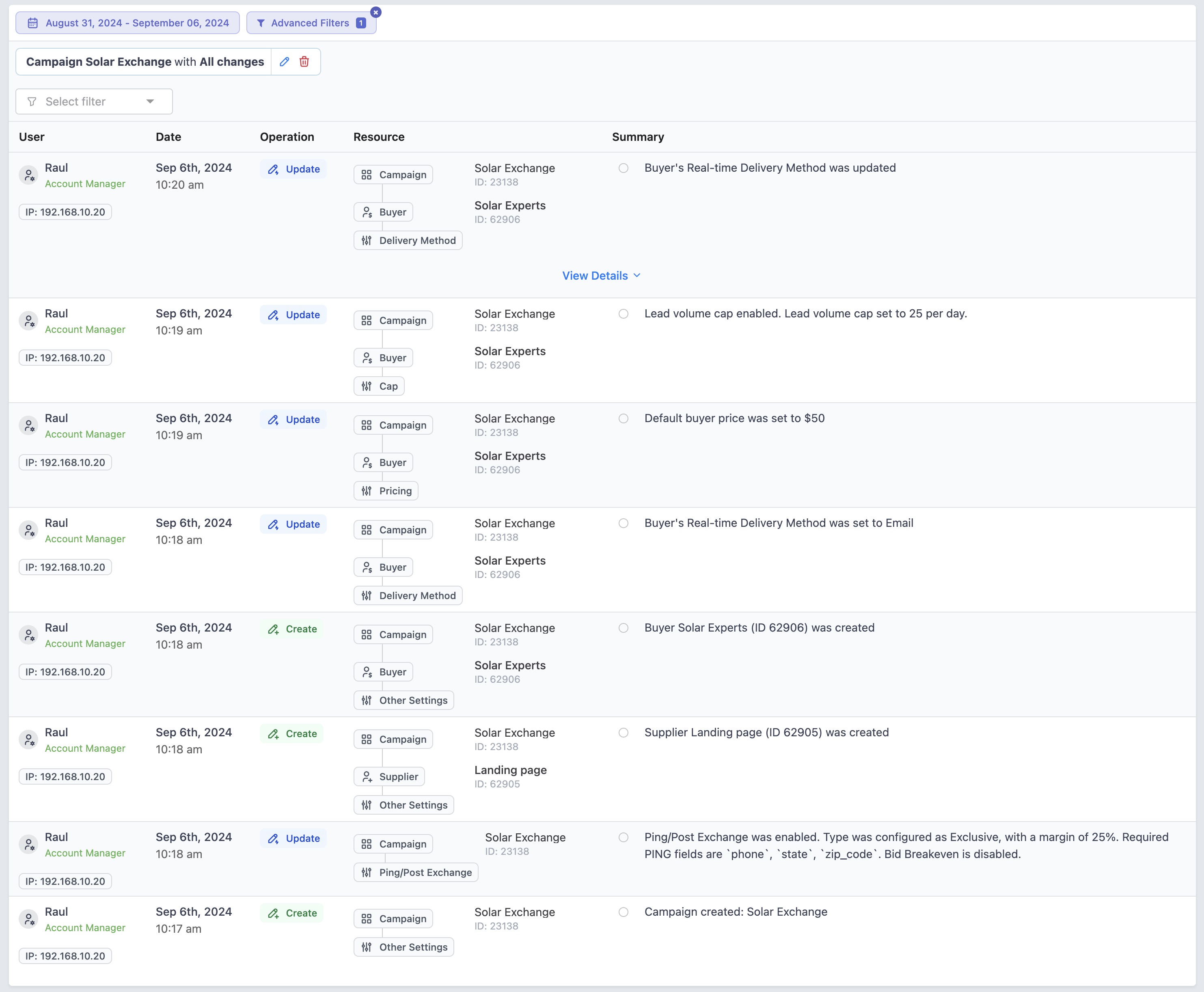
On the Change Logs page, you can:
- View account activity in chronological order
- Filter by date range, user, campaign, client, billing, lead exports, lead returns, or team member changes
- Filter by operation type (Add & Activate, Modify & Update, Remove & Deactivate)
- Filter by IP address
- Compare before-and-after values for any update
Change Logs provides full transparency into your account activity, making it easy to understand what changes were made, when they occurred, and who made them. It is especially useful when troubleshooting campaign or buyer configuration issues, reviewing billing or compliance-related updates, monitoring team member activity, or confirming when and how a specific setting was modified. With detailed filtering options and clear before-and-after comparisons, you can quickly identify exactly what changed and why.
For more details on Change Logs please review our support article here - https://support.leadprosper.io/article/638-change-logs-overview-view-system-user-activity