.png)
Supplier Portal - Platform Tour
The Supplier Portal provides a secure, self-service dashboard for your suppliers, allowing them to log in and view detailed lead data, performance analytics, and reporting for the leads they send into your campaigns.
Through the portal, suppliers can monitor lead outcomes, track revenue, review returns, and export data—giving them full visibility into how their traffic performs across your Lead Prosper campaigns.

Who Typically Uses This Page
- Administrators who want to provide suppliers with transparent reporting and reduce support requests
- Suppliers who need visibility into lead performance, revenue, and delivery outcomes across campaigns
Key Things You Can Do
As an Admin
- Grant Supplier Portal access by adding supplier emails to a Client
- Manage and resend portal invitations
- Control which suppliers have access to specific Clients and campaigns
- Provide suppliers with real-time visibility into their lead performance
As a Supplier
- Log in and view lead performance across one or multiple accounts
- Monitor key metrics such as accepted leads, duplicates, failures, returns, and revenue
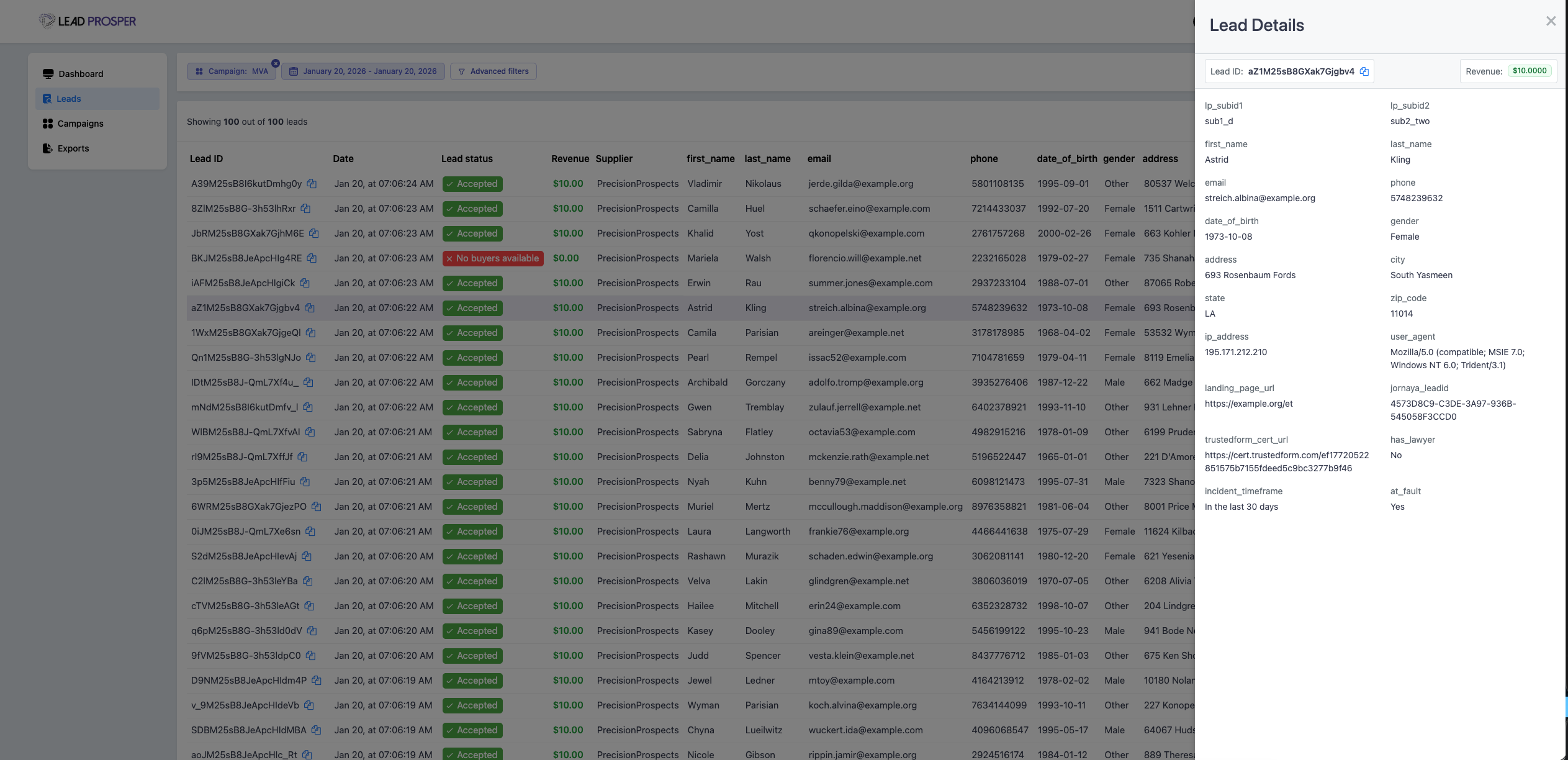
- View detailed lead-level data for every submitted lead
- Search for leads using identifiers like email, phone number, or LP Lead ID
- Export lead data in CSV or Excel format
- Access Supplier API specifications for connected campaigns
Important Features
Centralized Multi-Account Access
Suppliers can use a single login to access multiple Lead Prosper accounts they’ve been invited to. This allows them to view and manage performance across all partnerships in one place without needing separate logins.
Performance Dashboard
The dashboard provides a high-level overview of supplier performance across campaigns, including:
- Total Leads
- Net Accepted Leads
- Failed and Duplicate Leads
- Returns
- Net Revenue
This gives suppliers a quick snapshot of how their traffic is performing over any selected time frame.
Lead-Level Transparency
Suppliers can drill down into individual leads to view full details, including:
- Lead status (Accepted, Duplicate, Failed)
- Revenue per lead
- Return status and reasons
- All submitted field data
This level of transparency helps suppliers understand exactly what is happening with each lead they send.
Advanced Filtering & Search
Suppliers can filter and segment lead data by:
- Campaign
- Date range and timezone
- Lead status (Accepted, Duplicate, Failed)
- Returned vs non-returned leads
- Test vs live leads
They can also search for specific leads using identifiers like email, phone number, TrustedForm Cert URL, or Jornaya LeadID.
Data Exports
Suppliers can export lead data on demand in CSV or Excel format, with options to:
- Customize export name and description
- Send exports to multiple email addresses
- Download export files directly from the portal (available for a limited time)
Campaign & API Visibility
Suppliers can view all campaigns they are connected to and access their Supplier API specifications directly from the portal, making it easier to manage integrations and troubleshoot delivery.
The Supplier Portal improves transparency and communication between you and your suppliers by giving them direct access to performance data, lead outcomes, and reporting.
By reducing the need for manual reporting and back-and-forth support requests, it allows suppliers to independently monitor and optimize their traffic—while helping you build stronger relationships and scale operations more efficiently.