.png)
Pausing Campaigns & Buyers On Specific Calendar Dates in Lead Prosper
You can now pause or block specific calendar dates at the Global, Supplier, or Buyer level in Lead Prosper. This is useful for holidays or scheduled downtime when you don’t want to accept leads.
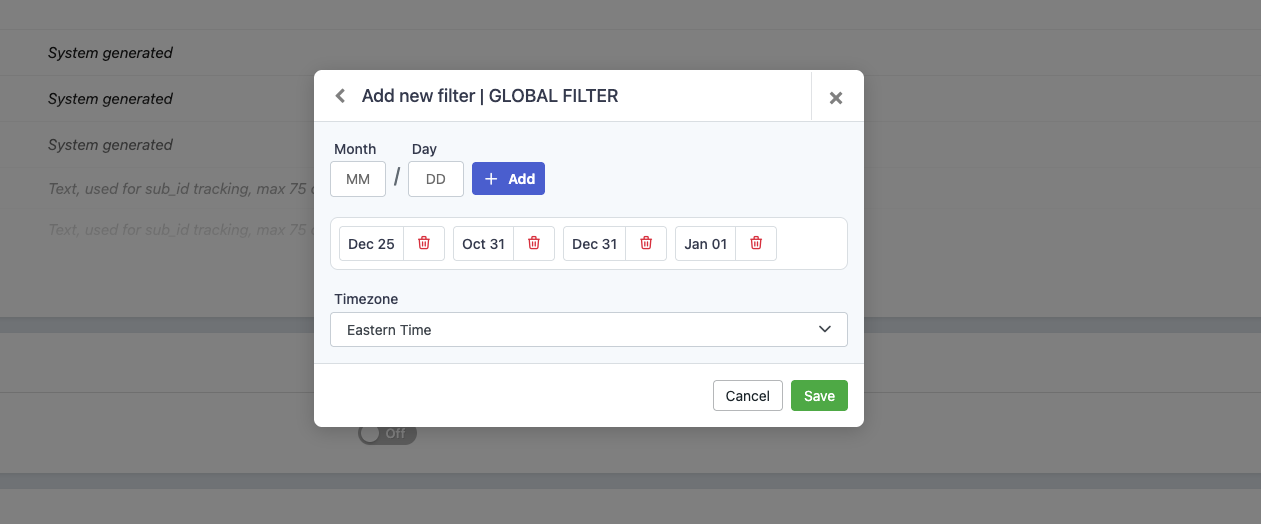
How to Use the Block Calendar Dates Filter
- Go to the Filters section in your Lead Prosper campaign.
- Choose the filter level:
- To apply it at the campaign level, go to Global Filters.
- You can also add it under Supplier Filters or Buyer Filters for more granular control.
-
Add the filter:
Click Add, then select Block Calendar Dates from the dropdown list.
- Set your blocked dates:
-
Enter the month and day for the date you want to block.
Choose your Timezone to ensure accuracy.
Example entries:
- Christmas Day →
12/25 - New Year’s Eve →
12/31 -
New Year’s Day →
01/01Leads will automatically be blocked from midnight to midnight on the selected date.
- Christmas Day →
-
Managing and Updating Dates
-
Permanent holidays:
Fixed-date holidays like Christmas or New Year’s Day can remain in place indefinitely.
-
Variable holidays:
For holidays that change each year (like Thanksgiving or Easter), you’ll need to update the dates manually.
To remove or change a blocked date, click the red trash can icon next to it, then re-add the new date as needed.
Using the Block Calendar Dates filter is a simple but powerful way to keep your campaigns running smoothly year-round. Whether you’re preventing leads during national holidays, coordinating with partner schedules, or planning maintenance downtime, this filter gives you full control and peace of mind that your campaigns won’t receive leads when they shouldn’t.