.png)
A Complete Guide To Reading And Understanding Lead Prosper Supplier API Specs
When you create a new Supplier in your Lead Prosper campaign, a set of Supplier API Specs is generated for that specific Supplier. The Supplier API Specs contain everything the Supplier needs to successfully send leads into your campaign via API request. This guide covers every section of the Supplier API Specs so you can understand what is required.
Test Mode
When a new Supplier is created, it is automatically placed in Test Mode. If the Supplier is in Test Mode, a yellow banner reading "THIS CAMPAIGN IS CURRENTLY IN TEST MODE" will appear across the top of the API Specs. While in Test Mode, all leads sent through that Supplier will be flagged as test leads within the campaign.

Campaign and Supplier Name
At the top of the API Specs you will see the Campaign Name or Public Name (if one has been set). When setting up a campaign, a Campaign Name is required, but you can also assign a Public Name that will display in place of the Campaign Name. This is useful when your internal Campaign Name contains details you do not want visible on public-facing items like the Supplier API Specs or the Customer Portal.
Underneath the Campaign Name is the Supplier Name for that particular Supplier.
Fields
The Fields section is a detailed list of all campaign fields — required and optional — along with their specific details. Any fields displayed in bold are required fields.
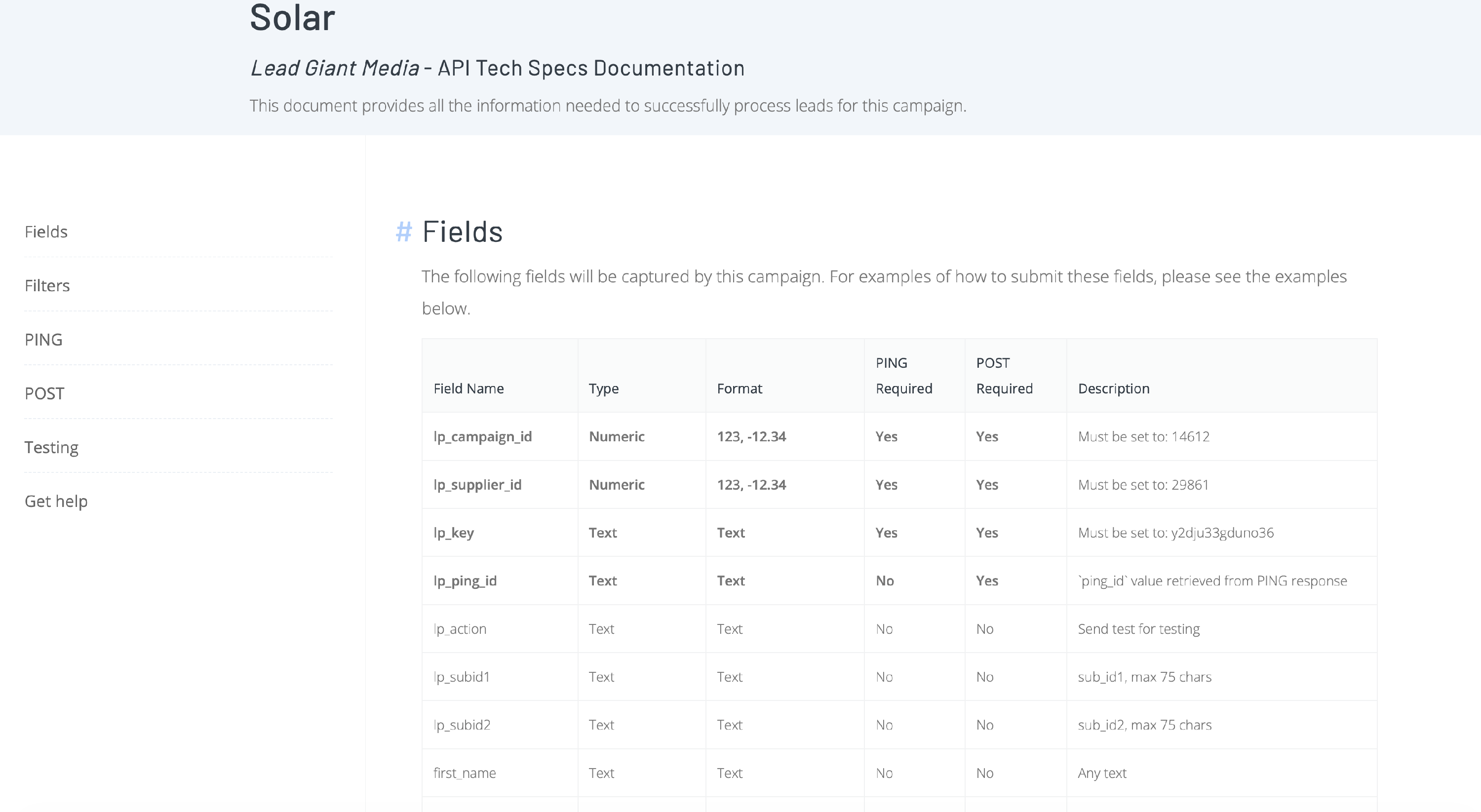
Note: All campaign fields will appear here except any fields the user has specifically marked as hidden from the API Specs.
The field list includes the following columns:
- Field Name — The exact field name that must be used when sending data. Field names are case sensitive (e.g.,
first_nameis not the same asFirst_Name). - Type — The campaign field type. Possible types include: Text, Numeric, Email, Phone, Date & Time, List of Allowed Values, State, Postal Code, IP Address, and URL.
- Format — The format the data must be sent in for that field.
- PING / POST Required — Indicates whether the field is optional or required on the PING (if a Ping Post Exchange) or POST. Required fields are highlighted in bold.
- Description — A generic description based on the field type, or custom description text if one has been set for that campaign field.
System-Required Fields
Every Supplier will have three required fields with static values that must be included in every API request:
| Field | Description |
|---|---|
lp_campaign_id |
The Campaign ID. The required value is shown in the Description column where it reads "Must be set to: {VALUE}". |
lp_supplier_id |
The unique Supplier ID. The required value is shown in the Description column where it reads "Must be set to: {VALUE}". |
lp_key |
The unique hash key associated with the Supplier ID. The required value is shown in the Description column where it reads "Must be set to: {VALUE}". |
There may be additional required fields depending on the campaign type:
lp_ping_id— In a Ping Post Exchange, this field must be sent on the POST. The value is the uniqueping_idreturned in the PING response.
Active Filters
If there are any active Global or Supplier-level filters, they will be displayed in this section. Each filter shows the following:
- Action — Allow or Block.
- Condition — The matching logic (e.g., "equal to," "equals one of these values," etc.).
- Values — The specific values for the filter.
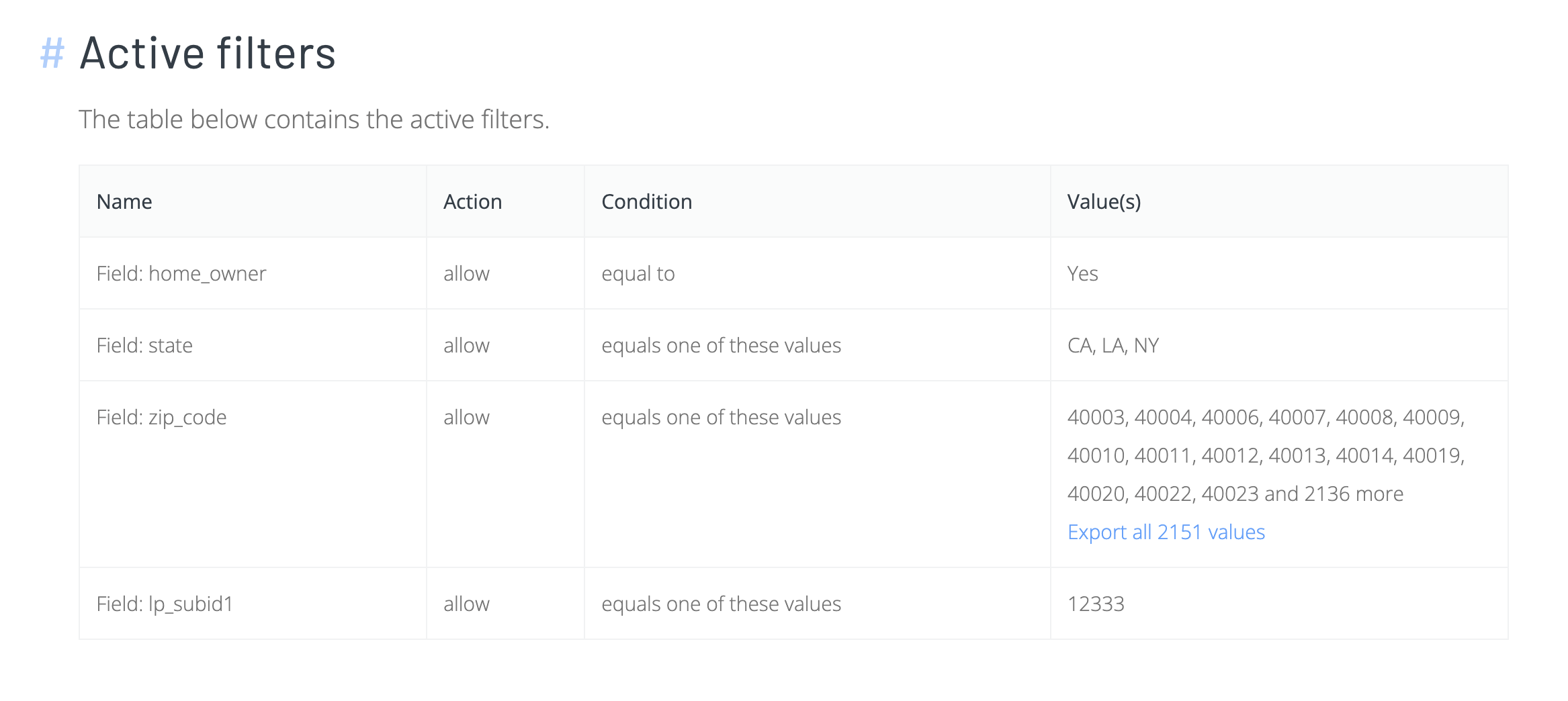
When there is an excessive number of filter values (such as a list of several thousand zip codes), a link to export and download all values will be provided.
If you are the Supplier, use these filters to ensure you are only sending leads that meet the listed criteria.
Posting Directions
Depending on your campaign type and options, the API Specs may include different posting sections. Every Supplier API Specs page will include at least the POST details. If the campaign uses a Ping Post Exchange, the PING details will also appear. If you have a Direct Post campaign with Pre-Ping Dupe Checking enabled, the Pre-Ping Dupe Check details will be included as well.
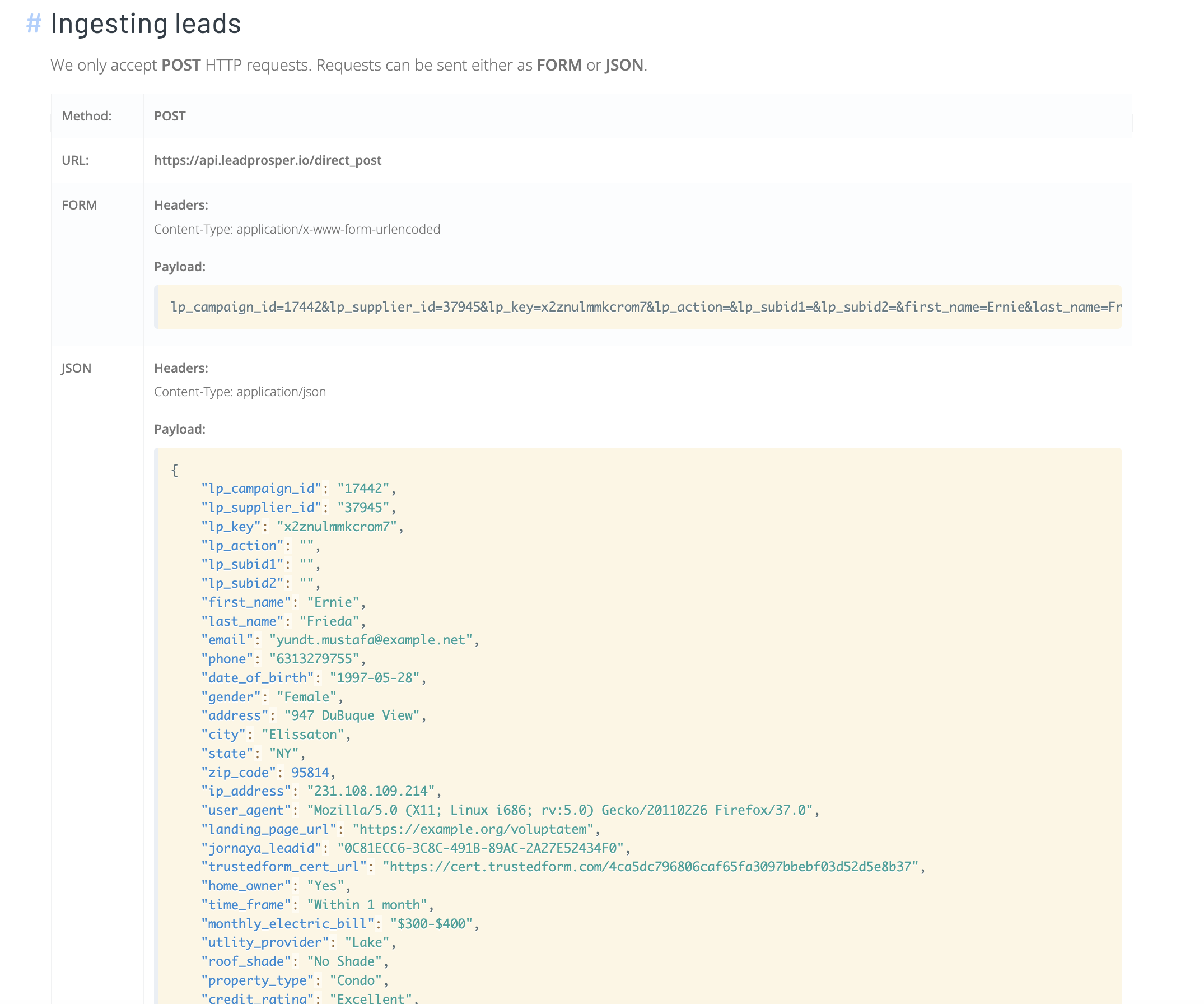
Lead Prosper only accepts POST HTTP requests. Requests can be sent as either FORM or JSON. XML is not supported.
Each posting section contains the exact requirements, including the method, posting URL, headers for both FORM and JSON formats, example payloads, and example responses for Accepted, Duplicate, and Error/Rejected outcomes.
Direct Post Campaign
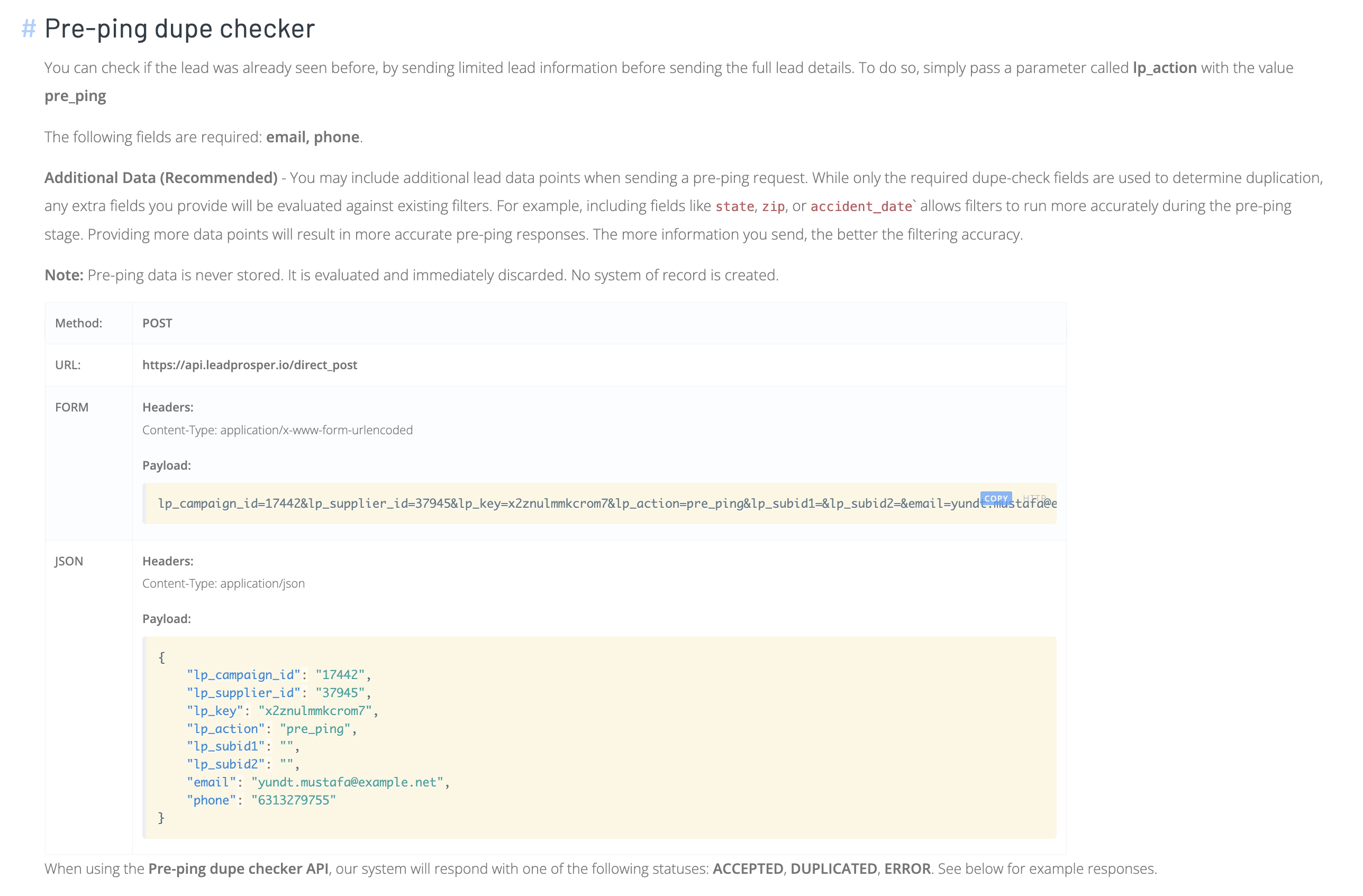
Pre-Ping Dupe Checker (Optional)
| Detail | Value |
|---|---|
| Method | POST |
| URL | https://api.leadprosper.io/direct_post |
| FORM Headers | Content-Type: application/x-www-form-urlencoded |
| JSON Headers | Content-Type: application/json |
The body must include lp_action=pre_ping
POST
| Detail | Value |
|---|---|
| Method | POST |
| URL | https://api.leadprosper.io/direct_post |
| FORM Headers | Content-Type: application/x-www-form-urlencoded |
| JSON Headers | Content-Type: application/json |
Ping Post Exchange
PING
| Detail | Value |
|---|---|
| Method | POST |
| URL | https://api.leadprosper.io/ping |
| FORM Headers | Content-Type: application/x-www-form-urlencoded |
| JSON Headers | Content-Type: application/json |
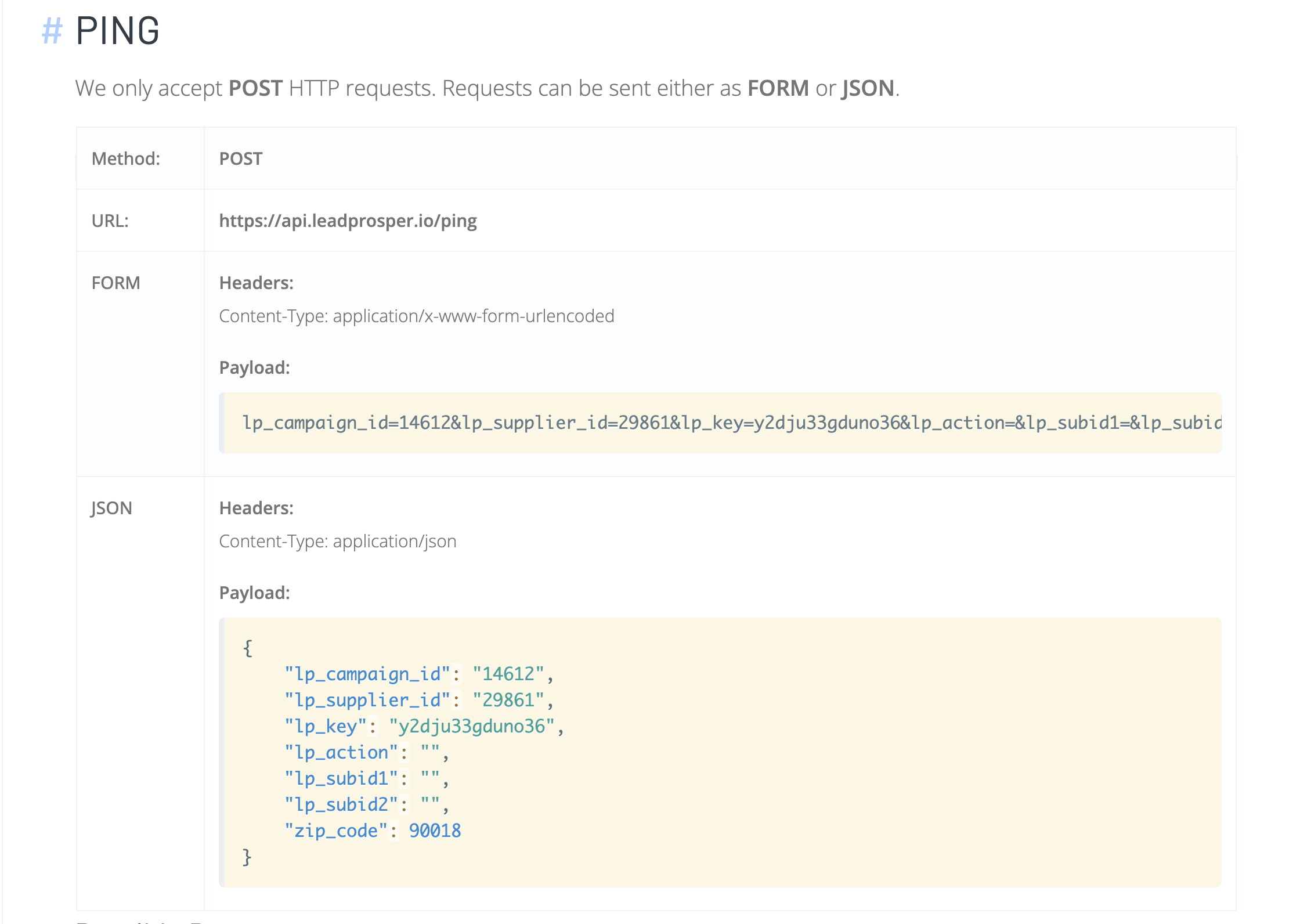
POST
| Detail | Value |
|---|---|
| Method | POST |
| URL | https://api.leadprosper.io/post |
| FORM Headers | Content-Type: application/x-www-form-urlencoded |
| JSON Headers | Content-Type: application/json |
The body must include lp_ping_id with the ping_id value returned in the PING API response.
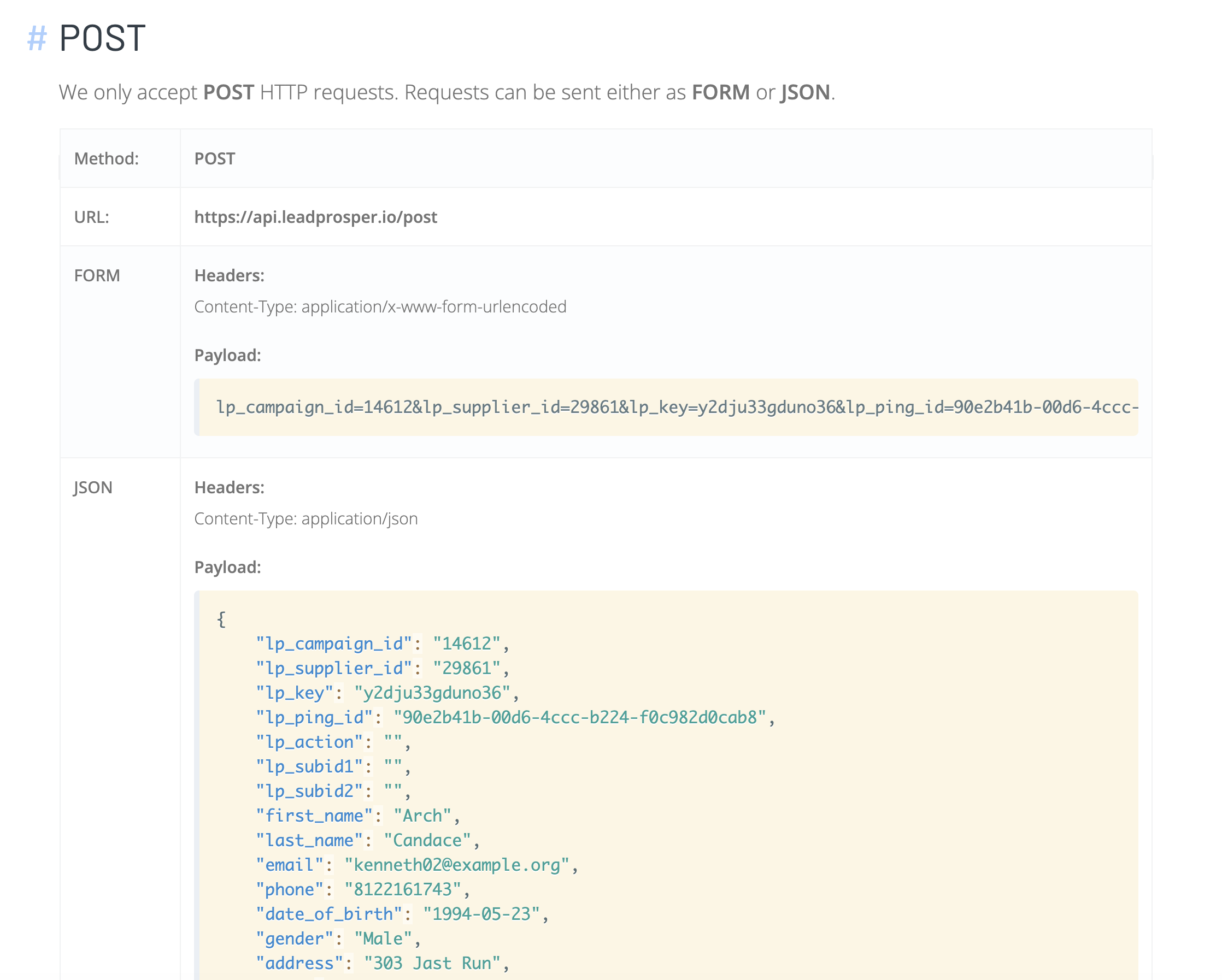
Example Payloads
Example payloads are provided based on the campaign fields for the specific campaign. They include all system-required fields with the appropriate values for lp_campaign_id , lp_supplier_id , and lp_key , as well as any additional required campaign fields with example values. These payloads can be used as plug-and-play templates for mapping your payloads, testing, and so on.
Possible Responses
Possible responses are provided for each type of request. Response types include Accepted, Duplicate, and Error/Rejected. These responses contain everything a Supplier needs to properly configure all response mappings on their end.
The Possible Responses will also include any and all options and settings that are enabled for the Campaign under Customize Supplier API Specs settings. This can include Customized Fields, Buyer Data, Metadata, Validation Error Details, and more.


Testing
If the Supplier is live (not in Test Mode), you can still mark individual leads as test leads by including the field lp_action with the value test in the request.
Help
This section displays either the main account email address or the Tech Email Address set on the Lead Prosper Account Settings page. Use this contact for any questions about the API Specs or campaign setup.
That covers every section of the Supplier API Specs. With this information, a Supplier should have everything needed to set up their integration and start sending leads into a Lead Prosper campaign.