.png)
Billing Page - Platform Tour
The Billing page allows Lead Prosper administrators to monitor account usage, review billing activity, and manage payment details. From this page, you can view your current monthly usage, check unpaid invoices, review account credits, and update the payment method associated with your account.
This page serves as the central location for understanding how your account is being billed and reviewing the activity that contributes to your monthly charges.
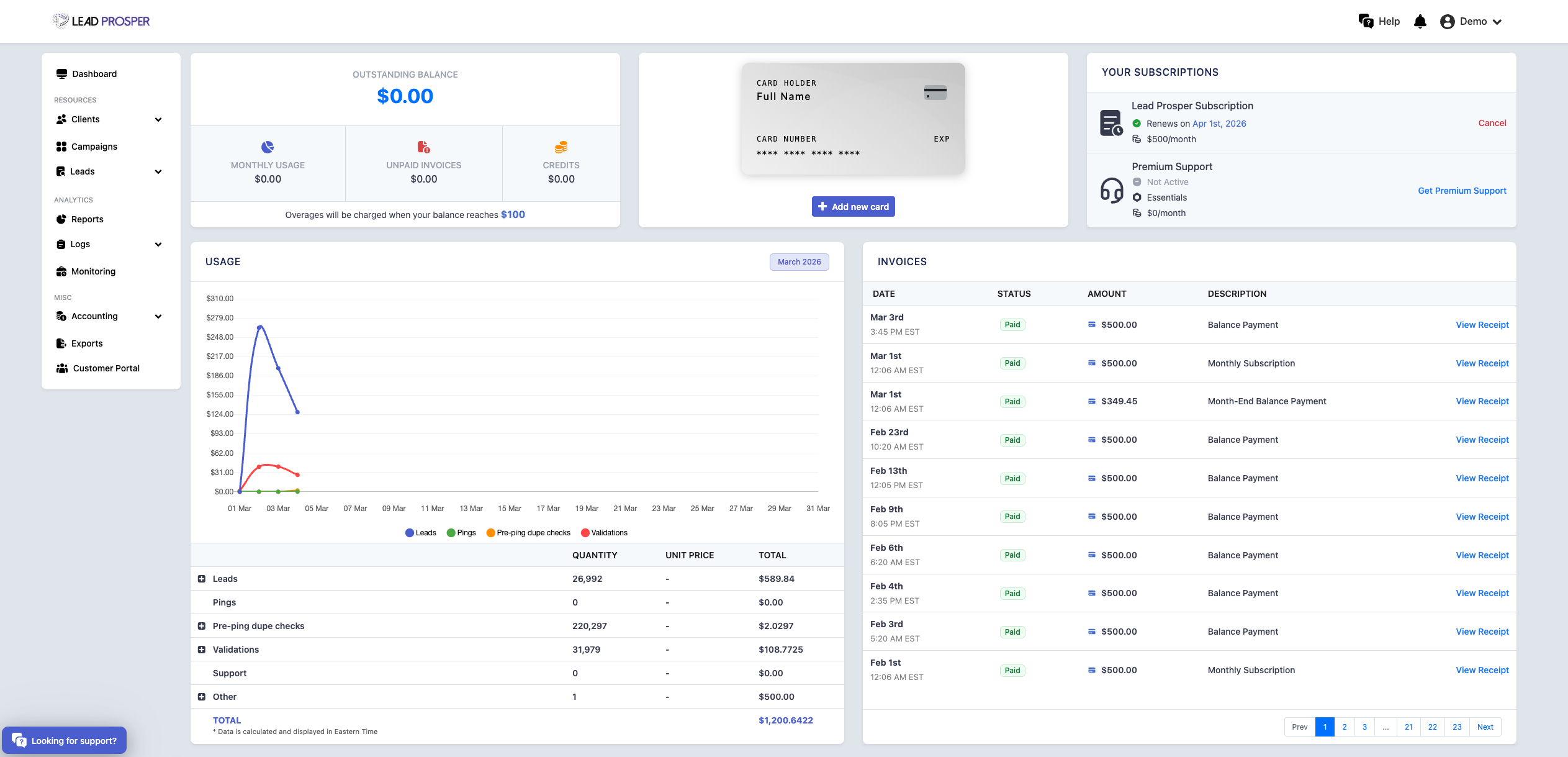
On the Billing page, you can:
- View current billing status, including monthly usage, unpaid invoices, and account credits
- Review a detailed breakdown of account usage for the selected billing period
- See totals for activity such as leads, pings, pre-ping duplicate checks, validations, and more
- View and download billing invoices
- Manage your payment method, including editing or removing the card on file
- Cancel your Lead Prosper account if needed
The Billing page provides clear visibility into how your account is being used and how that usage translates into billing activity. It is commonly used to review monthly balances, confirm unpaid invoices or available credits, update payment methods, and analyze usage metrics for the current billing period. By providing a detailed breakdown of account activity alongside billing records and invoices, this page helps administrators maintain accurate financial oversight of their Lead Prosper account.