.png)
Team Members - Platform Tour
The Team Members page allows administrators to manage user accounts for people on their team who need access to the Lead Prosper platform. From this page, you can invite new team members, update user roles and permissions, and manage account access settings.
By assigning the appropriate role and permissions to each team member, you can control what parts of the platform they can access and what actions they are allowed to perform.
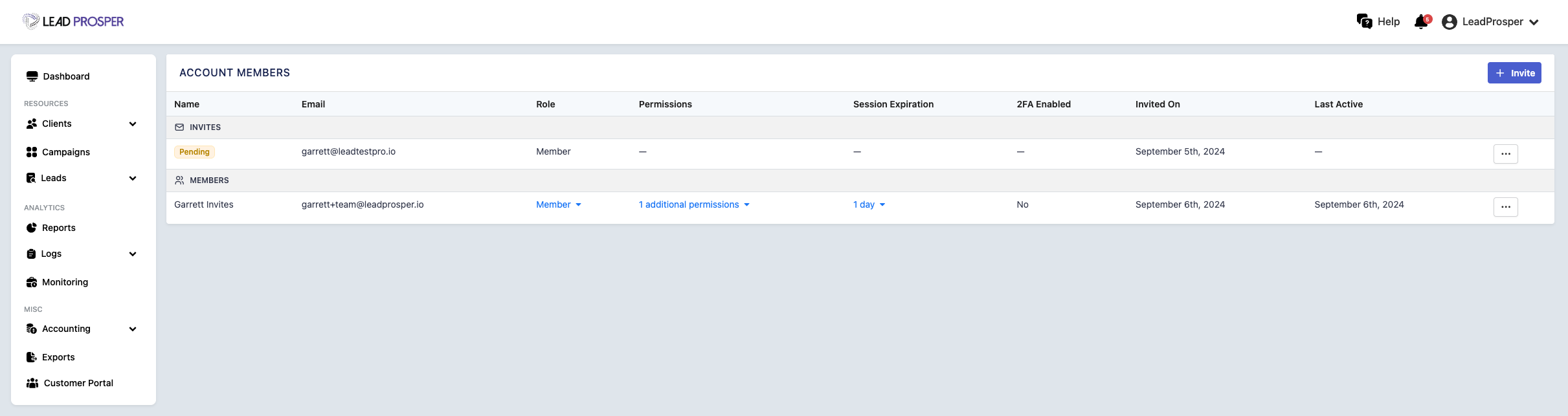
On the Team Members page, you can:
- Add, edit, or remove team member accounts
- Assign or update user roles for your team
- Grant additional permissions to specific team members
- Configure the default session expiration for logged-in team members
- Manage invitations for new users joining the account
User Roles
- Administrators - Full access to all platform features
- Member - Can manage campaigns, suppliers, and buyers but cannot edit billing settings
- Viewer - Read-only access across the platform
- Billing - Access to billing settings and read-only access to reports
Additional Permissions
- Delete Data - grants the team member the ability to delete items in the account regardless of their user role.
- Export Data - grants the team member the ability to export data if they are set as a Viewer or Billing user.
- Customer Portal Access - allows the team member the ability to log into the Customer Portal from the Lead Prosper admin area.
The Team Members page helps ensure that everyone on your team has the appropriate level of access to manage your Lead Prosper account. It is commonly used when adding new users, updating roles or permissions, or adjusting security settings for account access. Properly managing team member roles and permissions helps maintain operational control while ensuring that team members can access the tools they need to do their work.